 Technology
Network Help
Wi-FI 802.11
Technology
Network Help
Wi-FI 802.11
See also Multi-Band Wi-Fi here and Wireless Routers in Products
 Under Construction.
Protocols | Security | Interference | Hotspots | Airports | Multi-Band wireless
Protocols
| 802.11b (Wi-Fi) | 2.4GHz | 1,2,5.5,11 Mbs | PAN (Apple AirBus),PDA, Mobil Phone to PC Distance 65 ft. 11Mbs 100-175 ft 5.5Mbs, 175-200 ft. 2 Mbs |
| 802.11g | 2.4GHz | 54 Mbs | PAN/WLAN, also supports 802.11b |
| 802.11a (Wi-Fi5) | 5.5 GHz | 54, 108 Mbs | PAN/WLAN Distance 0-20 ft. 54Mbs, 20-40' 48Mbs, 40-75' 36Mbs, 75-85' 24Mbs, 85-135' 18Mbs, 135-175' 12Mbs, 175-200+ 6Mbs |
| 802.11n | 2.4 & 5GHz | 100-450 Mbps | |
| 802.11ac | 2.4 & 5GHz | 290 Mbps- 3.5 Gbps | 802.11ac protocol also offers downstream Multi User-Multiple Input Multiple Output (MU-MIMO) technology, which is designed to provide bandwidth to multiple devices simultaneously rather than sequentially. An AC1600 delivers 300 Mbps (2.4 GHz) and 1300 Mbps (5GHz) An AC1900 delivers 600 Mbps (2.4 GHz) and 1300 Mbps (5GHz) An AC3200 delivers 600 Mbps (2.4 GHz) and 2x 1300 Mbps (5GHz) |
| 802.11ad | 2.4 & 5GHz & 60GHz WiGig | 290 Mbps- 7Gbps | 60MHz will not propagate thru walls. When roaming away from the main room, the protocol can switch to make use of the other lower bands. AD7200 800Mbps on 2.4GHz, 1733Mbps on 5GHz, and 4600Mbps on 60GHz |
Device (Client) speeds
| Device | protocol | Max Speed | Actual |
|---|---|---|---|
| MacBook Pro 2015 | 802.11ac | 300mbps @ 2.4GHz, 1300mbps @ 5GHz | 800mbps |
| iPad Air 2 | 802.11ac | 180mbps | |
| iPad Pro | 802.11ac | 866mbps | |
| iPhone 6 | 802.11ac | 100mbps | |
| 2015 Apple TV | 802.11ac |
Security
- Change default admin password on Access Point (Linksys, D-link, Airport, ...)
- Change default SSID (Don't use your name)
- Turn off SSID broadcase (Note some PC cards will not work with it turned off)
- Setup Security to require a password for access and encryption of transmissions. e.g. WEP, WPA, 802.11i
- Enable MAC filtering and set up a list of MAC addresses allowed to connect
- Turn off disk sharing (or add passwords on your PC)
WPA is actually a snapshot of the current version of 802.11i, which includes Temporal Key Integrity Protocol (TKIP) and 802.1x mechanisms. The combination of these two mechanisms provides dynamic key encryption and mutual authentication, something much needed in WLANs.
See: WI-Fi Security
DLink: Authentication - When enabling Encryption, the Authentication type can also be selected. If Shared Key is selected, the DWL-800AP+ will not be seen on the wireless network except to the wireless clients that share the same WEP key. If Open System is chosen, it will be visible to all devices on the network regardless of WEP keys. The default value for Authentication is set to "Auto", which will automatically adjust.
See: Wired Equivalent Privacy (WEP)
Interference
Other devices cordless phones, baby monitors, etc transmit on 2.4 GHz and newer cordless phones transmit on 5.8 GHz and can cause interference.
Multi Band Routers:
In 2009 the 802.11n dual band standard came out which uses the 2.4 GHz and 5GHz frequency bands.The 2.4 GHz band is heavily used and very crowded, in part because it provides only three non-overlapping channels.
In 2016 the 802.11ad Tri-Band standard became available, with 90 GHz added to 2.4 and 5 Ghz.
The 5 GHz band with 23 non-overlapping channels provides cleaner reception with less interference.
See Multi band Wireless for more information.
Range Extenders
For a large house or building you may need a range extender.There are repeaters, range-extenders and mesh networks.
See Range Extenders
Macintosh
AirPort is 802.11 compatible.The 2015 MacBook Pro has an 802.11ac (300 + 1300 Mbps) wi-fi card.
Go to "About This Mac" under the Apple icon Menu
Select System Report > Network > Wi-Fi to see the specs
Hold down option when clicking on the Wi-Fi icon at the top of the screen.
See Wi-Fi testing for more.
This will give you data Transmit Rate (Tx), Signal Strength (RSSI dBm) Channel, Noise etc.
I primarily use TX and RSSI

TX = Transmission rate
I get 867 - 1300 Mbps 30 inches from my D-Link DIR-868L from Optimum.
I get 7-27 Mbps in the back bedroom at the cabin with the Netgear modem by the TV
I get 50-88 Mbps in the back bedroom at the cabin with the Netgear modem in the kitchen

RSSI - Receive Signal Strength Indicator
dBm - power levels in mW (milliwatts). see MetaGeek
-30 dBm  Amazing
-67 dBm  Very Good -
-70 dBm  OK - Minimum for reliable packet delivery
-80 dBM  Not Good - Minimum for basic connectivity.

I get -22dBm to right next to my D-Link DIR-868L fromm Optimum.
See the attenuation table in Multi band wireless
There will also be a Wireless Diagnostics menu item you can click to get more information.
It will open the Wireless Diagnostics app.
Click Scan under Window in the menu bar.
Hotspots
Service Providers
 Wi Fi Zone - free in some places
You may get direct access or the first time you try to connect to the internet you will be redirected to a site which asks for an account and password which you get from the establishment providing the service.
 T-Mobile - $6/hr., $10/day, $30-40/mo.
The first time you try to connect to the internet you will be redirected to a T-Mobil sign up page which asks for a credit card.
 Boingo - $8/day, $22/mo.
The first time you try to connect to the internet you will be redirected to a T-Mobil sign up page which asks for a credit card.
Other wireless ISPs:
Go Remote, iBAHN, IPASS,
Orange France, Remote Pipes, SBC, Sprint, WeRoam,
Wise.
See Hotspot Lists and Locations and Airports in the travel section
WarWalking
WarWalking is walking around a neighborhood to find wireless networks.
Use software like: NetStumbler and MacStumbler
WarChalking
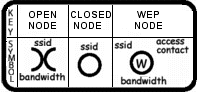
People may mark hotspots with Chalk using the following symbols:
www.warchalking.org
Terms
See:
Wireless LAN Glossary
AP - Access Point - An interface between the wireless network and a wired
 network. Access points combined with a distribution system (e.g. Ethernet).
 A Wireless hub
BSS - Basic Service Set  - A set of 802.11-compliant stations that operate
as a fully-connected wireless network.
ESSID - Extended Service Set Identifier (see SSID below)
MAC - Media Access Control - All network cards and interfaces have a unique
MAC address built into them.
SSID - Service Set Identifier - An network identifier.  Identifier attached to
packets sent over the wireless LAN that is used for joining a particular
radio network (BSS).  May or may not be broadcast so new devices can find a network.
WEP - Wired Equivalent Privacy - Generates secret shared encryption keys
that both source and destination stations can use to alter frame bits to
avoid disclosure to eavesdroppers.

See Also:

Network Attached Storage (NAS)

Wireless Routers in Products

(7) Phil Kearney - Former Apple network guru answers questions | Quora

 Wi-Fi Networking News
Add on Hi-Gain Antennas

Bandwidth for Streaming Video

HotSpot News

How to extend Wi-Fi range, increase speed and fix problems | Expert Reviews


Return to Networking

last updated 13 Jun 2012